System configuration tool
The System configuration tool is a system configuration interface used primarily by administrators to manage and control access to RigBridge environments. This tool is not meant for general users, but rather for a select group of users who hold administrative or super-admin roles. Its main purpose is to manage user roles, access rights, and environment ownership within the application.
How it looks
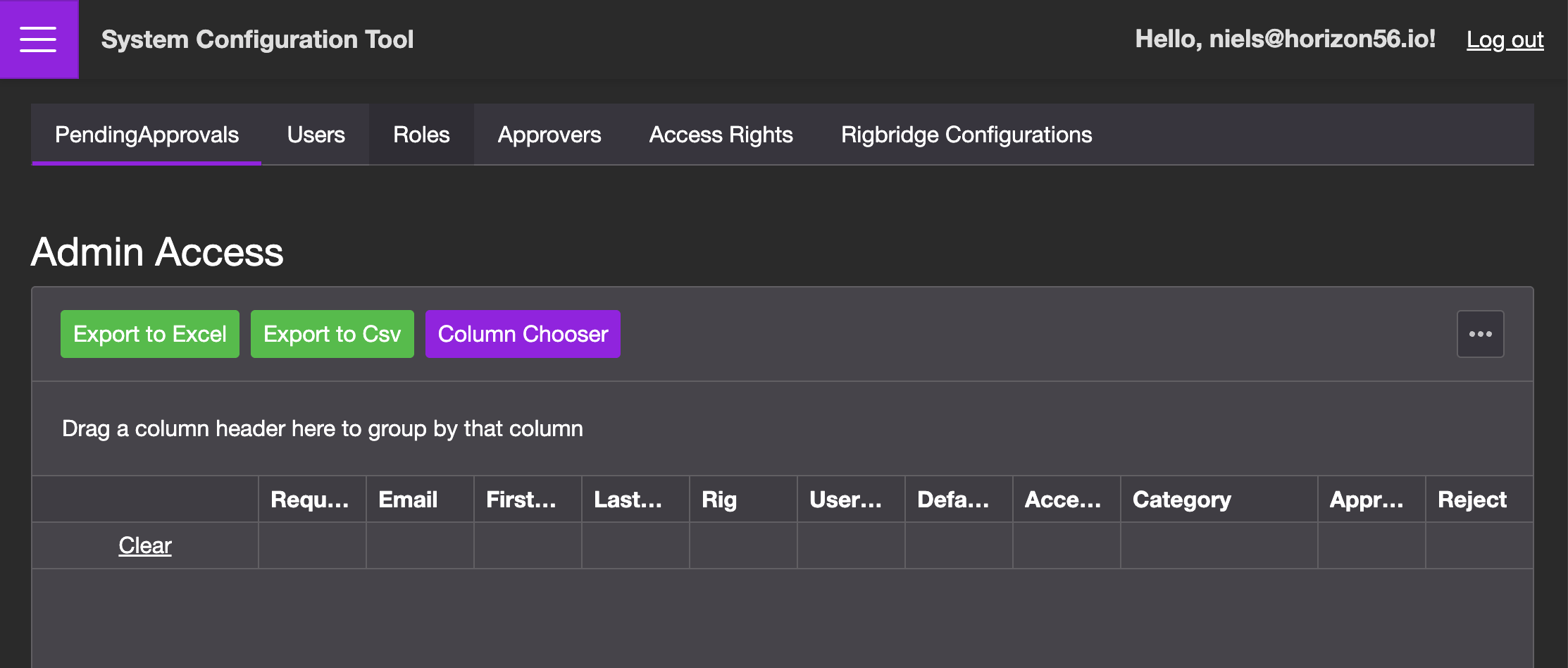
System configuration tool functions as an admin portal, primarily used by environment owners, Super Admins, and Admins to manage user roles, access rights, and configuration settings in RigBridge. It's structured around several dedicated tabs, each focused on a specific administrative task:
Pending Approvals: View and approve or reject incoming access requests. See more under Pending Approvals.
Users: Search for existing users and modify their roles or permissions. See more under Users.
Roles: Define and manage role types for different groups and environments. See more under roles
Approvers: Manage and review users who have been granted access. See more under approved
Access Rights: Which access rights has been set up on each of the roles added in RigBridge.
RigBridge Configurations: Configure system-level preferences or environment-specific settings. See more under RigBridge Configurations.
Each page within the system configuration is equipped with:
Export/Import functionality: You can export the current table data or import a new dataset.
Column Selector: Choose which columns to display, allowing you to customize your view.
Data Table: Contains detailed, role-specific information such as user email, role, access period, rig assignments, and more.
This structure allows administrators to effectively manage all key access and configuration tasks in one centralized place.
Step-by-step instructions
Get access to the System configuration
Open RigBridge System configuration tool: In your browser, enter your company’s RigBridge URL followed by
/sysconfig. For example:https://yourcompany.RigBridge.io/sysconfig. Replaceyourcompanywith your organization's specific subdomain.Log In: Enter your credentials to access the system. Horizon56 will initially add admins to System Configuration Tool.
Tips and tricks
Use the column chooser to reduce visual clutter and focus on the data you need.
Remember that only Super Admins can assign other Super Admins or modify RigBridge configurations.
Troubleshooting
If a user cannot be found, try searching under the Users tab using their full email address.
If access requests are not showing up, ensure the user submitted the request form successfully and selected the right environment.