User related questions
This article provides answers to some of the most common questions about RigBridge. To find an answers, find the one related to your problem and then look to see if your question has been answered.
- 1. Is it possible to copy a Phase, including the Plan, or do I need to first copy the Phase and then copy each individual Plan? Is there an easier way to copy when setting up a new well?
- 2. Is it possible to change or edit a active step in RigBridge?
- 3. When using the 'Report Back' option in a particular step, there is no option to select custom' in the 'Units' (in this example the Driller needs to report back a tag depth, to confirm hard cement has been encountered mMD)
- 4. How can we improve our plan to include filling the pipe every 500 meters more effectively without making it confusing to write and read? Would a simplified approach of just stating 'Fill every 500 meters' work?
- 5. I cannot remember my password to RigBridge.
- 6. I can't scroll down or up on the request access screen to submit.
- 7. I am not able to sign a plan (DOP, WWI, RAP). Why?
- 8. I am having trouble removing colour from the text.
- 9. I am having trouble copying and pasting activities and steps.
- 10. Does RigBridge support custom units in the report back and operational parameters?
- 11. I have two accounts. How do I change over to another Equinor account
1. | Is it possible to copy a Phase, including the Plan, or do I need to first copy the Phase and then copy each individual Plan? Is there an easier way to copy when setting up a new well? |
You have to copy the plan for itself, they are not included when you copy Well / Event / Phase.But you can copy all the plans during a Phase at the same time. Then use Select All at the top of the plan window and right-click on a plan and select Copy. You can see how to do it on Copy a plan | |
2. | Is it possible to change or edit a active step in RigBridge? |
Currently, you cannot edit an active step. You must add a new step after the active one and then complete the active step to proceed to the newly added step. You can see how you can do this under Operation. | |
3. | When using the 'Report Back' option in a particular step, there is no option to select custom' in the 'Units' (in this example the Driller needs to report back a tag depth, to confirm hard cement has been encountered mMD) |
RigBridge support custom units. Simply type in custom number after you choose number. You have to manually enter mMD, but it works as long as you choose a number, and the driller enters a number. | |
4. | How can we improve our plan to include filling the pipe every 500 meters more effectively without making it confusing to write and read? Would a simplified approach of just stating 'Fill every 500 meters' work? |
When creating a drilling plan, it's important to consider the following guidelines:
| |
5. | I cannot remember my password to RigBridge. |
RigBridge log-in is linked to your personal organizational email account. Your password is private and exclusive to you. Please try again using the password you utilize for your email account. If you can't remember your password, you need to contact you organizations IT support team for a password reset. | |
6. | I can't scroll down or up on the request access screen to submit. |
Please access the browser settings by clicking the three dots in the top right corner. Then, adjust the zoom to 100%. Finally, you should be able to scroll through the web-page. You can also use [Ctrl] + [+] or [Ctrl] + [-] to zoom in and out.  | |
7. | I am not able to sign a plan (DOP, WWI, RAP). Why? |
If you are unable to sign plan (DOP, WWI, RAP), it is likely that you do not have the correct role in RigBridge. You can apply for the role through the request access portal. If it is urgent, please contact our support team. | |
8. | I am having trouble removing colour from the text. |
To remove formatting, select the text and click the "clear formatting" button in the text editor. 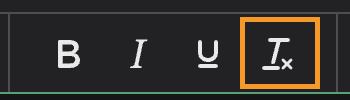 | |
9. | I am having trouble copying and pasting activities and steps. |
We have noticed that some users face issues with the activities and steps copy-paste function. One common reason for this could be the browser blocking the copy-pasting feature. To resolve this issue, please check your browser window for a prompt that asks you to unlock for copy-paste. Click on this prompt and you should be able to use the copy-paste function without any further issues. | |
10. | Does RigBridge support custom units in the report back and operational parameters? |
Custom units are supported in RigBridge. Enter the desired unit, then add text and select a number. | |
11. | I have two accounts. How do I change over to another Equinor account |
Please request access to the assist you want with the email you want to keep. Please note which emails you want to get deleted in the additional comments. If you have an doubt, please get in touch with a support agent. |