Published
Once all assigned approvers have signed off, the plan transitions into the Published state. This means the plan is finalized, approved, and ready to be executed, either in RigFlow or shared as a locked reference document. This stage marks the end of the planning process and the beginning of operational readiness.
Note
When the plan is Published, you can revoke it from RigFlow and make additional changes.
Once it is started, the status in RigBridge will change from Published to Started.
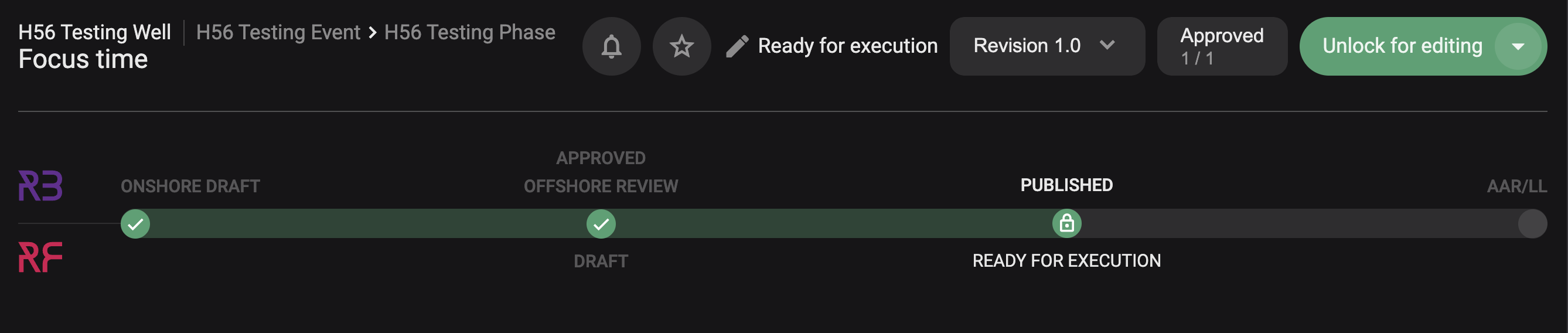
The following will happen in this state:
The plan is now read-only: Once published, the plan is locked. No edits can be made unless it’s explicitly revoked.
Execution teams can access it: The plan becomes visible in RigFlow (if integrated), and offshore personnel can begin execution.
Auto-publish or manual: If Auto-publish was enabled during approval, the plan moves to this state automatically. Otherwise, the plan owner must click Publish once all approvals are in.
Notifications may be sent: If the Notify user when plan is published toggle was enabled, selected users are alerted that the plan is now live.
Can be revoked for changes: If something needs to be updated, the plan owner can revoke the plan, make edits, and re-publish it after repeating the approval process.
Status visible to all: Everyone with access to the plan can now clearly see that it has been approved and published for use.
How to Manually Publish a Plan
Make sure all approvals are complete: Verify that every assigned approver has clicked Approve in the plan.
Open the Plan Editor: Navigate to the plan that's currently in Awaiting Approval status.
Click the “Publish” button: Once all approvals are complete, the green button in the Plan Status Bar will change to Publish. Click it to move the plan into the Published state.
Confirm the action: Click Publish to finalize.
Plan status updates to Published: The plan is now locked and available to the execution team.